I Accidentally Built a Microservice for a Spotify Widget
I recently added a Spotify "Now Playing" component to my portfolio website at tejaspathak.tech.
The goal was simple.
Show my currently playing Spotify track if music is active. Otherwise show the last played song.
At first this looked like a pretty straightforward feature.
Since my portfolio is built with Next.js, the easiest solution would have been using an API route like:
/api/spotify
Inside it I could fetch data from the Spotify Web API and return JSON to the frontend.
That would have worked perfectly fine.
I still ended up building a separate edge microservice for it using Cloudflare Workers.
Why I avoided Next.js API routes
The main reason was architectural separation.
I wanted the Spotify integration to behave like an isolated service instead of being tightly coupled to my frontend application.
Cloudflare Workers were interesting to me because they:
- run on V8 isolates instead of a traditional Node.js runtime
- deploy globally at the edge
- have extremely low startup overhead
- fit serverless and edge computing patterns really well
In practice this means the Worker runs closer to the user geographically instead of depending on a single fixed server region.
For something tiny like a Spotify widget, this is absolutely overkill.
But it was also a good excuse to learn:
- edge runtimes
- serverless architecture
- microservice boundaries
- request caching
- OAuth token management
- deployment isolation
The final architecture looked like this:
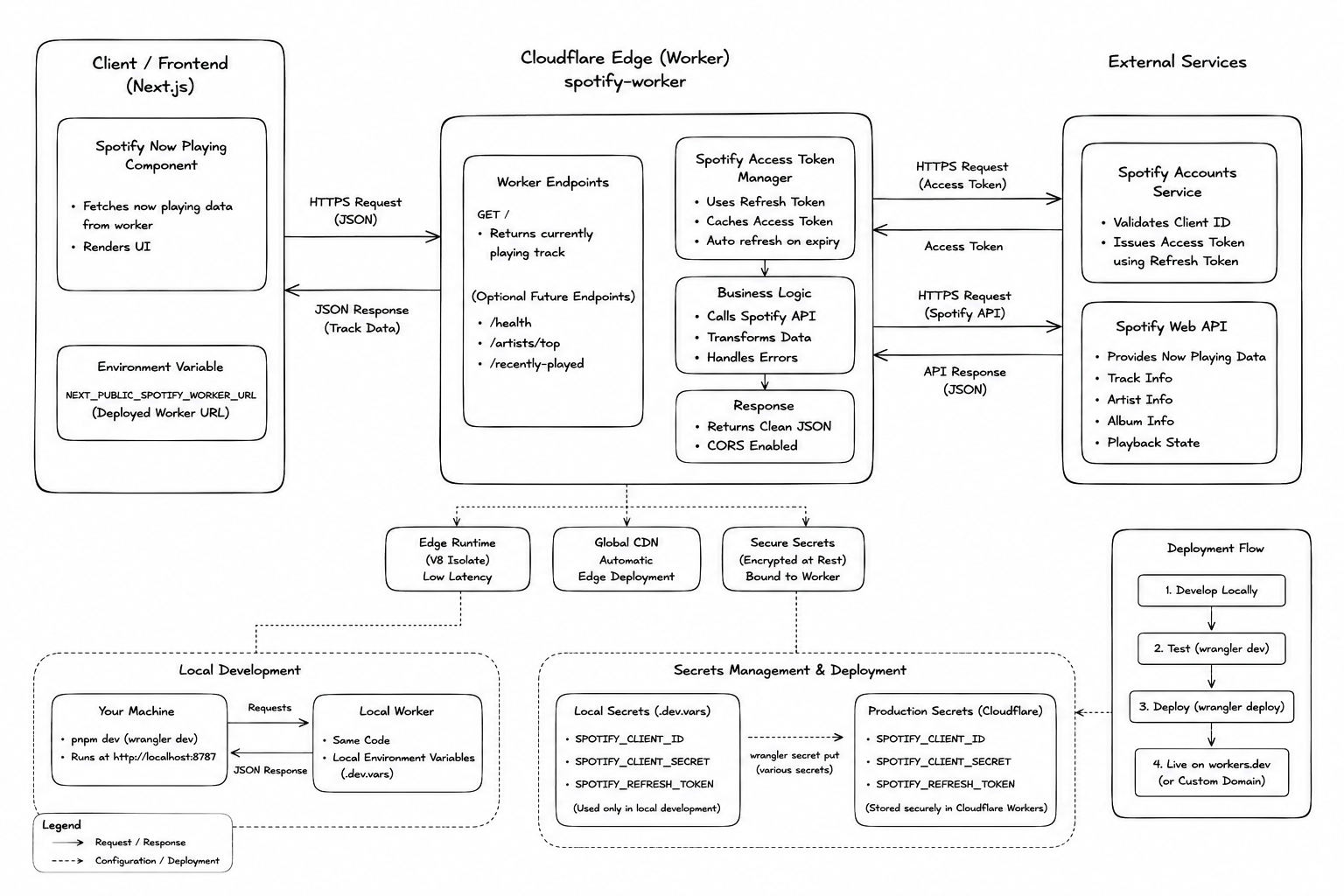
Migrating from npm to pnpm
Before building the Worker, I migrated my portfolio project from npm to pnpm.
A big reason was package isolation and stricter dependency behavior.
pnpm blocks untrusted build scripts by default and uses a content-addressable dependency store instead of duplicating massive node_modules folders everywhere.
Migration was surprisingly simple:
pnpm import
pnpm install
Then I removed:
package-lock.json- old
node_modules
After migration the project used:
pnpm-lock.yaml
instead.
Setting up the Worker
Instead of creating a completely separate backend repository, I kept the Worker inside the same repo.
The structure looked like this:
portfolio/
├── app/
├── components/
├── workers/
│   └── spotify-worker/
Technically this is not a full monorepo yet because the Worker still has its own lockfile and dependency tree, but it follows a similar organizational pattern.
I initialized the Worker using:
pnpm create cloudflare@latest spotify-worker
and selected:
- Worker only
- TypeScript
After deployment using:
pnpm wrangler deploy
Cloudflare generated a public .workers.dev URL which became the API endpoint for the frontend.
Spotify OAuth setup
The Worker needs three things from Spotify:
- Client ID
- Client Secret
- Refresh Token
The Client ID and Secret come directly from the Spotify Developer Dashboard.
The refresh token requires completing the OAuth flow manually.
First I generated an authorization URL:
https://accounts.spotify.com/authorize?client_id=YOUR_CLIENT_ID&response_type=code&redirect_uri=http://127.0.0.1:8787/callback&scope=user-read-currently-playing%20user-read-recently-played
After authenticating with Spotify, it redirected to:
http://127.0.0.1:8787/callback?code=XXXX
I copied the code parameter and exchanged it for tokens using:
curl -X POST "https://accounts.spotify.com/api/token" \
-H "Content-Type: application/x-www-form-urlencoded" \
-u "CLIENT_ID:CLIENT_SECRET" \
-d grant_type=authorization_code \
-d code=YOUR_CODE \
-d redirect_uri=http://127.0.0.1:8787/callback
Spotify returned:
- an access token
- a refresh token
The refresh token was then stored securely using Cloudflare Worker secrets:
pnpm wrangler secret put SPOTIFY_CLIENT_ID
pnpm wrangler secret put SPOTIFY_CLIENT_SECRET
pnpm wrangler secret put SPOTIFY_REFRESH_TOKEN
This keeps sensitive credentials completely outside the frontend.
Worker implementation
The Worker itself is pretty small.
I used TypeScript interfaces to strongly type:
- Spotify API responses
- environment variables
- normalized frontend responses
The frontend expects data in this format:
interface SpotifyTrackResponse {
  isPlaying: boolean;
  title: string;
  artist: string;
  album: string;
  albumImageUrl: string;
  songUrl: string;
  playedAt: string | null;
  progressMs: number;
  durationMs: number;
}
The Worker flow looks like this:
- Use the refresh token to request a short-lived Spotify access token
- Fetch the currently playing track
- If nothing is playing, fetch the most recently played track
- Normalize the response shape
- Return clean JSON to the frontend
Handling rate limits properly
One important part was handling Spotify rate limits correctly.
I added a utility function with exponential backoff support for HTTP 429 responses.
Whenever Spotify returns a Retry-After header, the Worker pauses before retrying the request.
Without this, repeated polling from the frontend could eventually trigger stricter rate limiting.
Fetching the currently playing track
The Worker first checks active playback:
const currentlyPlayingUrl =
  'https://api.spotify.com/v1/me/player/currently-playing';
If Spotify returns:
204 No Content
the Worker falls back to:
const recentlyPlayedUrl =
  'https://api.spotify.com/v1/me/player/recently-played?limit=1';
This makes the component feel responsive even when nothing is actively playing.
Edge caching strategy
I used different cache durations depending on playback state.
For active playback:
max-age=5
For recently played tracks:
max-age=60
Active playback changes constantly, while recently played songs are relatively stable.
This reduces unnecessary API requests while keeping the UI close to real-time.
Final frontend component
Once the Worker API was working, the frontend only needed to fetch JSON from the deployed Worker URL.
The component itself ended up becoming a vinyl-inspired animated player UI with:
- dark mode
- light mode
- animated record spinning when active playback
- tonearm over the record when active playback
- album artwork
- playback state handling
Ironically the frontend part turned out to be simpler than the infrastructure behind it.
For a Spotify widget, I think this was definitely over-engineered.